1
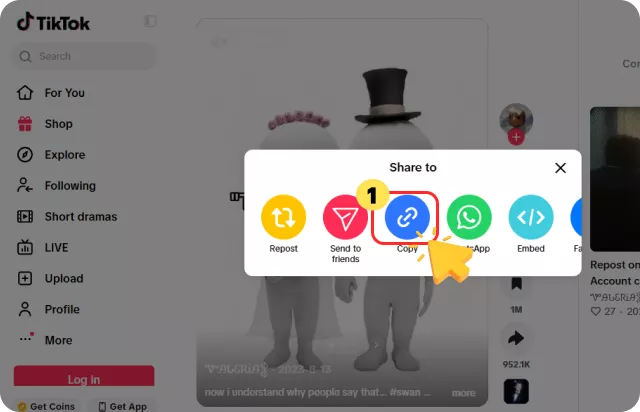
Copy the TikTok Slideshow Link
Open the photo post or slideshow in TikTok, tap Share, and choose "Copy link".

Download every photo from a public TikTok slideshow without watermark for free.
 No Login100% FreeFull Size (HD & 4K)No Watermark
Here are 3 simple steps on how to save every photo from a TikTok slide.
Open the photo post or slideshow in TikTok, tap Share, and choose "Copy link".
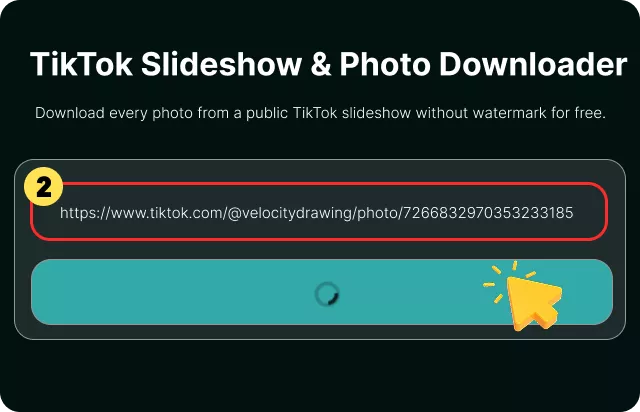
Paste the copied TikTok link into the FliFlik input box and click the "Download" button. FliFlik will parse the post and list every image in the slideshow, without watermark.
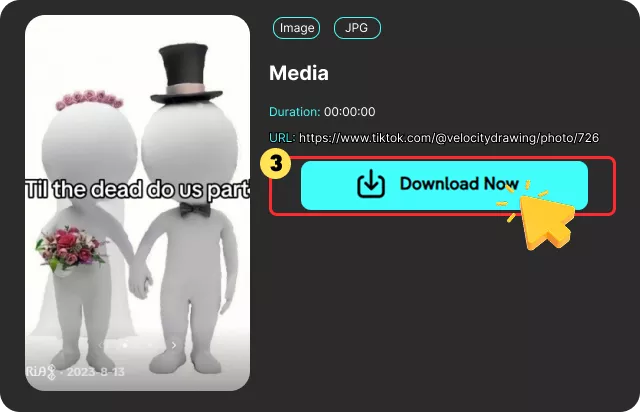
Pick what fits your needs: download individual images, grab every photo in one ZIP archive, or render the whole slideshow as an MP4 with the original music. Files save to your device in a few seconds.
FliFlik lets you download pictures from TikTok photo posts, multi-image carousels, and slideshows. No app installation required.

Download TikTok photo no watermark and without extra compression. This is not a screenshot, so quality matches what the creator uploaded.

TikTok photo posts can contain up to 35 images. Download TikTok slideshow in full — every image is listed in the order it appears, not just the cover photo.

When the post has a sound, the slideshow can be rendered as an MP4 video with the original audio and transitions close to the source.

Our TikTok slideshow downloader fetches the original image files at full resolution. Typical file sizes range from about 150KB for a single photo to 900KB for a slideshow frame.

No account creation or additional software installation is required. Simply visit the webpage to download tiktok slideshow content for free.

Download TikTok photos smoothly on any device, including computers, smartphones, and tablets, with a seamless experience across all major browsers.
On iPhone and iPad: In Safari, files save to the Files app under Downloads. Chrome saves to Photos or Files depending on your iOS version. If a ZIP file will not open, long-press the download button and choose "Download Linked File", then open the Files app to extract it.
On Android: Use Chrome, Firefox, Samsung Internet, or Edge. Downloaded images typically appear in your Gallery app, Downloads folder, or Pictures directory. Accept the storage permission request when it appears.
On Mac and Windows: Any major browser works. Files will be saved to your system Downloads folder automatically. Desktop browsers handle large carousel batches more efficiently.
Yes. FliFlik is a web-based tool that lets you download TikTok photo content for free. Just copy the post link, paste it into FliFlik, and click "Download".
 We use cookies to improve your FliFlik experience. Read our policy here.