Free AI Face Swap — No Login Required
Try Free Now

Best Free Suno AI Music Downloader

Download Suno songs to MP3, WAV, or MP4 — no Pro tier, login, or installation required.

e.g. https://suno.com/s/JOt9kOzspjqqZLk6

Why Choose FliFlik for the Best Suno AI Music Downloader?

100% Free to Use

FliFlik is 100% free to use with absolutely zero hidden fees, subscriptions, or paywalls. You don't need to create an account on FliFlik, and you don't need a Suno Pro membership either. Just paste the song's link into your browser and click download. You can enjoy your offline music in seconds without spending a dime.

Multiple Formats Support

FliFlik provides multiple output formats to satisfy every creative and playback need. It delivers crisp 320kbps MP3s for premium daily offline listening. For creators, it provides high-fidelity WAV formats for seamless audio editing and mixing. You can also download Suno songs to MP4 formats with embedded lyrics videos, perfect for instant social sharing.

Unlimited Suno Downloads

Download as many tracks as you want with zero daily limits or caps. Whether you need to download an entire Suno playlist or archive hundreds of your Suno AI creations, FliFlik keeps up with your pace. No throttling, no waiting in line—just pure, endless downloading freedom whenever you want to save.

Any Suno Track Available

Whether it’s your own AI track or a song made by another creator, FliFlik can download any music you love. Unlike the official Suno platform, which only allows you to download your own creations, FliFlik removes this barrier. As long as you have the Suno track link, you can just paste it into FliFlik, and the tool will handle the rest.

How to Download Music from Suno AI?

Using FliFlik makes Suno music downloads easy in just 3 simple steps.

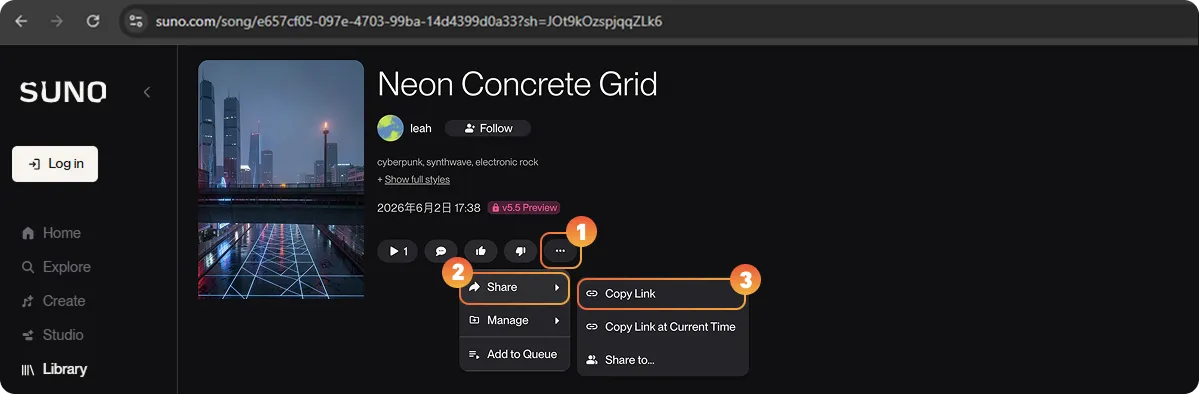
Step 1: Copy the Suno song's URL

Navigate to the Suno website or app, find and play the song you want to download. Click the ⋯ menu → select "Share" and copy the link. Or you can copy the desired song URL from the address bar directly.

Copy the Suno song's URL

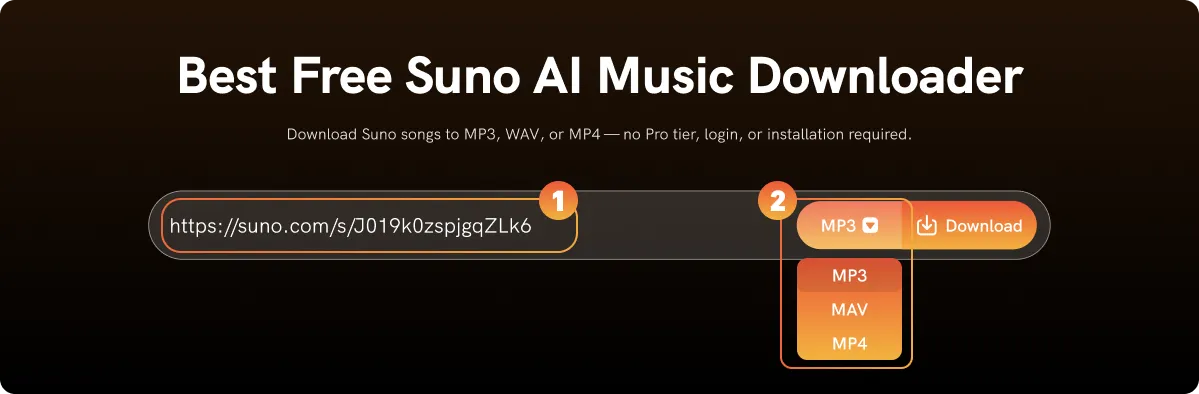
Step 2: Paste and Choose Output Format

Open the FliFlik Suno Downloader website in a new tab, and paste the link into the input field, select your preferred output format, and hit the "Download" button to confirm your choice.

Paste and Choose Output Format

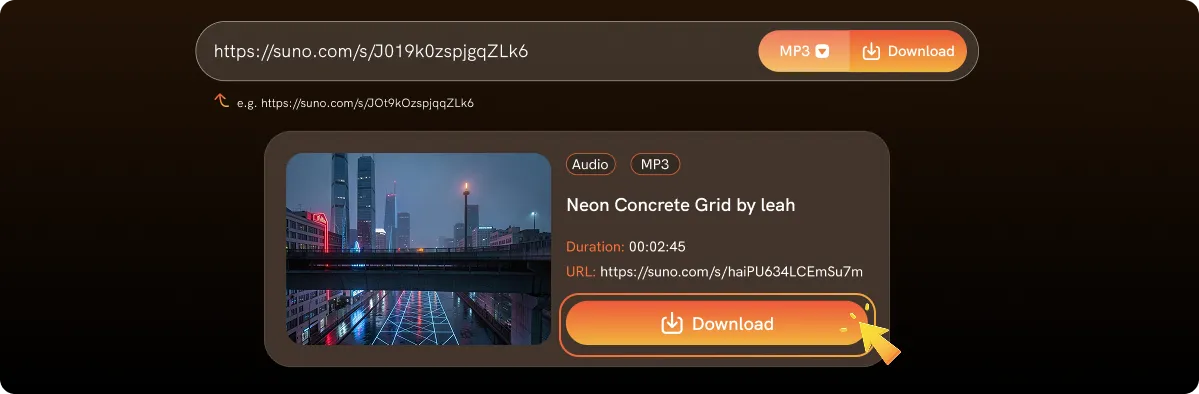
Step 3: Download Your Suno Song

The tool will quickly analyze your link. As soon as the analysis results appear, click the "Download" button to save Suno AI song in your preferred format.

Download Your Suno Song

What is Suno AI?

Suno AI is an innovative platform that takes the difficulty out of music creation. It uses artificial intelligence to turn your text descriptions or lyrics into complete songs. You get original melodies, lyrics, and full instrumentation in seconds. The best part is that you do not need traditional music skills, like singing or playing an instrument. Anyone can create their own music with Suno AI, it makes music production easy and open to everyone, no matter your musical background.

Why Do You Need A Suno Downloader?

While Suno AI is an amazing tool for making music, it comes with several strict download limitations. Generating a great song is easy, but saving it to your device can be a real challenge. Here is why you need a reliable downloader instead of using Suno's official feature:

  • No Downloads for Public Tracks: The official web tool completely blocks the download button for songs made by other creators. Even with a paid account, you cannot directly save someone else's music.

  • Low Audio Quality for Free Users: If you use a free account, Suno only allows you to download your music in low-quality MP3 format. High-quality formats like WAV are strictly locked.

  • Mobile Download Limitations: Downloading tracks on your phone is highly restricted. Instead of a full audio file, you often only get a very short video snippet of just 10 to 60 seconds.

  • Stricter Platform Rules: You must register and log in just to listen or download, and Suno’s download policies keep getting stricter.

Therefore, finding a reliable tool to get past these roadblocks is essential, and a Suno Downloader like FliFlik is exactly what you need. With FliFlik, you can easily save any Suno track in MP3, WAV, MP4 format. It is 100% free, and no login or sign-in is required, plus, there are even more benefits you can get from FliFlik Suno Downloader.

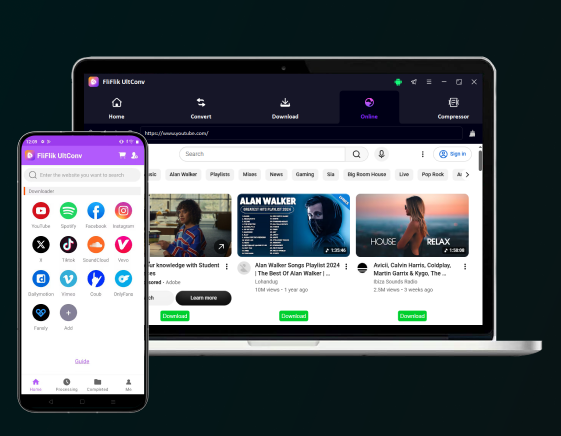
More Benefits You Can Get from FliFlik Suno Downloader

100% Private Safe

We never store your download history or track user activity. All data is cleared automatically, delivering a secure, private, and completely worry-free experience on your device.

Super-Fast Download

Save your favorite high-quality audio tracks in just a few seconds. Our advanced acceleration technology ensures each download is completed smoothly without any lagging or waiting.

Multilingual Support

FliFlik supports 10+ languages, including English, Español, Français, Deutsch, Traditional Chinese, and Japanese. You can easily switch to your preferred language and enjoy a smooth download experience!

All Devices Working

Whether you use Windows, Mac, iOS, or Android, FliFlik Suno Downloader runs perfectly. As long as your device can open a web browser, this tool delivers a seamless saving experience.

No Login Required

Skip the annoying registration forms entirely. FliFlik Suno Downloader allows you to grab audio files instantly, keeping the process hassle-free with zero profile tracking.

Ad-Free Experience

Unlike other online tools flooded with risky pop-ups, FliFlik provides a clean saving process. Experience a smooth, uninterrupted downloading journey without any malicious redirections.

FAQs about Suno Music Download

Officially, you can only download the Suno songs you created yourself. The platform does not allow you to directly download full-length tracks or playlist published by other users.

cookieWe use cookies to improve your FliFlik experience. Read our policy here.