1
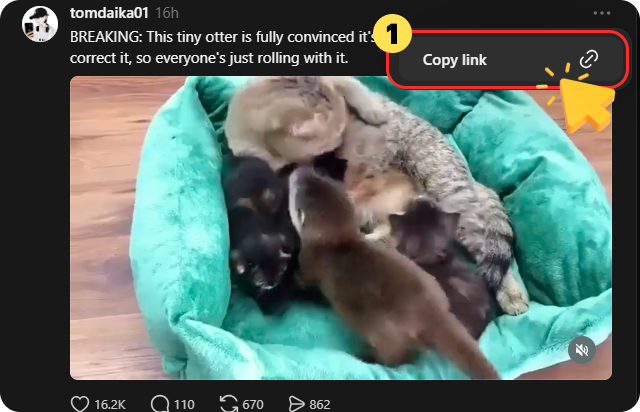
Copy the Threads Video Link
Open Threads and find the video you want to download. Tap the share icon and select "Copy link" to copy the video URL.

Download Threads videos in HD quality with FliFlik. No watermark, no login, just fast and easy downloads.
 No WatermarkFast Download100% FreeNo Login
Follow three simple steps to download Threads videos with this Online Threads Downloader easily.
Open Threads and find the video you want to download. Tap the share icon and select "Copy link" to copy the video URL.
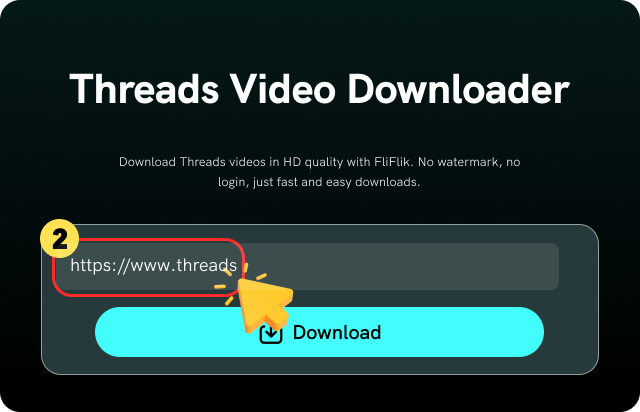
Paste the copied Threads video link into FliFlik Threads Downloader, and wait for the tool to analyze the video.
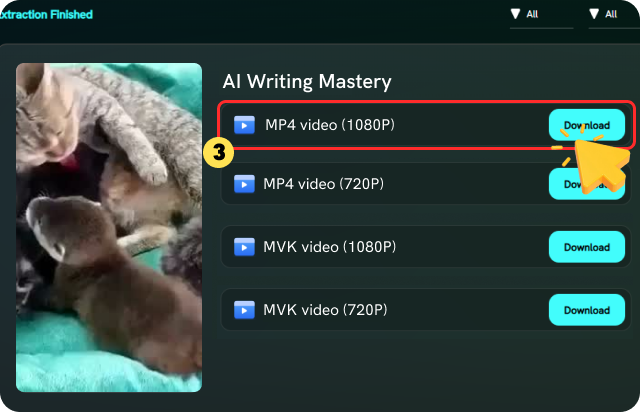
Choose your preferred quality and format, then click the Download button to save the Threads video to your device.
FliFlik provides a simple and reliable way to download Threads videos with high quality and smooth downloads.

Unlike many online tools with hidden limits, FliFlik lets you download Threads videos freely without restrictions. Save as many videos as you need with no subscriptions, daily limits, or unexpected charges.

Simply paste a Threads video link into FliFlik, and the downloader automatically detects and analyzes the content. Your video is ready to download in seconds without extra steps.

Download Threads videos in their original HD quality without compression. FliFlik preserves sharp details and smooth playback, so saved videos look as clear as the originals.

FliFlik supports downloading Threads videos in MP4, MKV, MP3, and other formats. Choose the format that fits your device, playback needs, or sharing preferences.

FliFlik provides a clean downloading experience with no pop-ups, malware, or unnecessary risks. Download Threads videos safely with stable performance and reliable results.

As a browser-based Threads video downloader, FliFlik works smoothly on Windows, Mac, iPhone, Android, tablets, and more. Download videos online without installing extra software.
Explore the comparison below to see how FliFlik Threads Downloader stands out from other tools in terms of features, download experience, and reliability.
 Completely free
 Hidden feesNo limits
 Daily capsNo login neededLogin neededSupportedQuality may varyMP4/MKV/MP3MP4 onlySupportedSupportedAny browser, any deviceMay not support all devicesNo ads or trackingAds, pop-ups, or redirectsHigh success rateLinks may fail
I've tried several Threads video downloader online tools that claim to be completely free, but many of them come with hidden fees or daily limits after a few downloads. That's why I switched to FliFlik, which lets me download Threads videos without worrying about subscriptions, extra charges, or download restrictions.

Olivia Bennett

What I like most is that I can download Threads videos for free without creating an account or installing anything. The whole process works directly in my browser, and the downloaded MP4 files play perfectly on both my phone and laptop. It's simple, reliable, and saves me a lot of time.

Emma Wilson
I was mainly looking for a safe way to save Threads videos without worrying about malware or suspicious websites. FliFlik gave me a much cleaner experience than other downloaders. No pop-ups, no redirects, and the whole process felt secure and reliable.

Kevin Lee
I've tried several Threads video downloader online tools that claim to be completely free, but many of them come with hidden fees or daily limits after a few downloads. That's why I switched to FliFlik, which lets me download Threads videos without worrying about subscriptions, extra charges, or download restrictions.
Olivia Bennett
What I like most is that I can download Threads videos for free without creating an account or installing anything. The whole process works directly in my browser, and the downloaded MP4 files play perfectly on both my phone and laptop. It's simple, reliable, and saves me a lot of time.
Emma Wilson
I was mainly looking for a safe way to save Threads videos without worrying about malware or suspicious websites. FliFlik gave me a much cleaner experience than other downloaders. No pop-ups, no redirects, and the whole process felt secure and reliable.
Kevin Lee
No. Threads doesn't provide a built-in download feature. To save videos, you can use FliFlik Threads Video Downloader to download them quickly by simply pasting the video link.
 We use cookies to improve your FliFlik experience. Read our policy here.