1
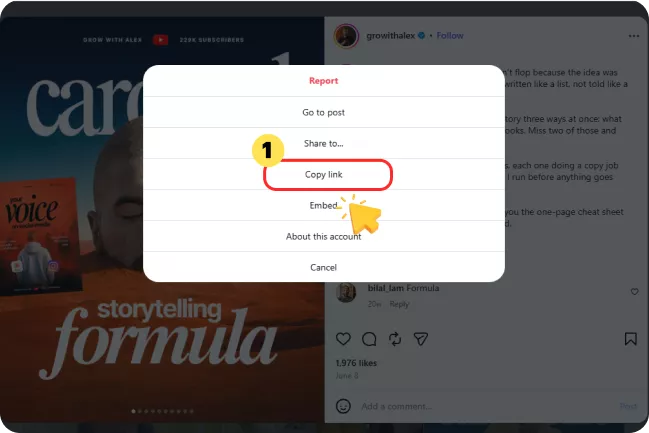
Copy the Carousel Post Link
Open Instagram and find the public multi-slide (carousel) post you want to download, tap the three-dot menu, and select "Copy link".

Download all photos and videos from Instagram carousel posts in one click. Save every slide from multi-photo posts as JPG or MP4 files for free.
 No Login100% FreeFull Size (HD & 4K)No Watermark
Learn how to download instagram carousel posts in original quality with 3 simple steps.
Open Instagram and find the public multi-slide (carousel) post you want to download, tap the three-dot menu, and select "Copy link".
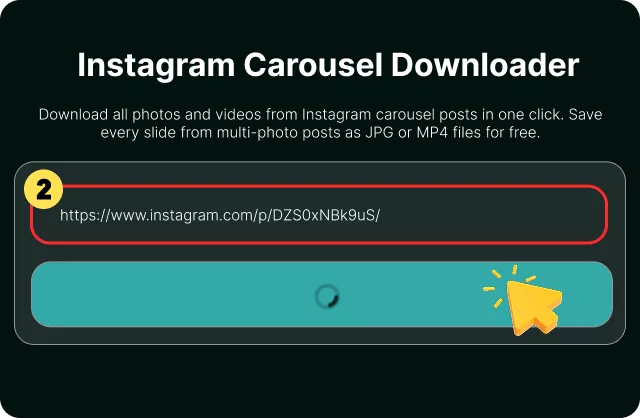
Paste the link into the search bar and click Download. The tool detects the carousel and displays every slide in sequence — photo slides and video slides alike.
Preview the slides, select the ones you want or choose all, and save them directly to your device. Photo slides save as JPG; video slides save as MP4.
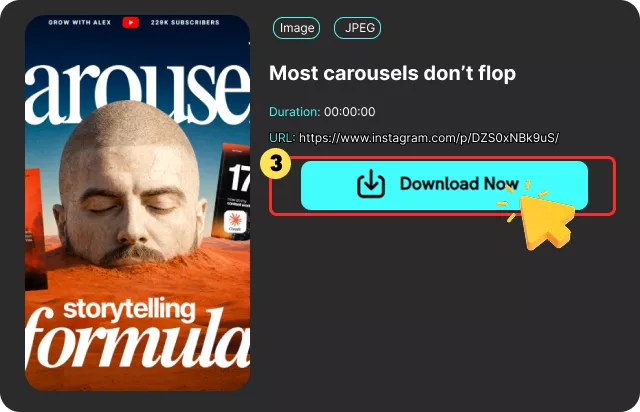
Tired of saving photo or video one by one? You can download all slides from Instagram in HD without watermarks using our IG Carousel Downloader.

Download full-size Instagram carousel posts in HD or 4K while preserving their original resolution. All slides are saved without blurring, resizing, or recompression, and without added watermarks or logos.

Instead of saving each slide individually, paste the post link once and the tool displays every slide. You can download a single image, select specific slides, or save the entire carousel in one batch.

Carousels that contain both photos and videos are supported. The tool identifies each media type and fetches the available files — JPG for photo slides, MP4 for video slides.

Use our free instagram album downloader without login or registration. No Chrome extension, no app, and no Instagram account required. Simply paste a link and download.

The tool does not store your links or download history. Your activity stays private, and no personal information is collected.

Save your favorite Instagram carousel posts online from any browser — Chrome, Safari, Firefox, or Edge — on desktop, tablet, or phone. No app installation needed.
On iPhone: Open the tool in Safari or Chrome and paste a public Instagram carousel link. Tap Download, swipe to the slide you want, then download that slide or all slides. In the Files app, press and hold each saved file and tap "Save Image" (or share a video) to add it to Photos.
On Android: Open Chrome, paste the public carousel link, and tap Download. Files land in your Downloads folder. Open Gallery or Photos and look under Downloads for each JPG or MP4 slide.
Mixed albums save photos as images and video slides as video files — sort by type in Files if the album is long.
Yes. FliFlik Instagram Carousel Downloader is free to use. You can download instagram carousel posts online without registration or subscription.
 We use cookies to improve your FliFlik experience. Read our policy here.