Free AI Face Swap — No Login Required
Try Free Now

Tenor GIF Downloader

Download GIFs and stickers from Tenor in original quality for free.

  • No Login
  • 100% Free
  • HD & 4K Quality

Best Tenor Downloader Online

Our tenor downloader will help you download gif from tenor quickly, easily, and for free. Whether you want a single reaction GIF or a complete collection of animated content, our tool makes it effortless.

Download Tenor GIFs

Save Tenor GIFs in their original format. As a dedicated tenor downloader, this tool allows you to download gif tenor with ease. Save individual GIFs or complete collections for your social media posts, messaging apps, or creative projects

Download Tenor GIFs as MP4

Convert and save Tenor GIFs as MP4 video files. Our tenor mp4 downloader gives you a universal video format that works on any device or platform, perfect for editing projects and social media content.

No Registration or Software Installation

Unlike many websites, you don't have to go through any lengthy process of registration or surveys. No software installation is required—your web browser is all you need.

Works on All Devices

Use our Tenor Downloader on Windows, Mac, Android, iPhone, and all leading web browsers including Chrome, Firefox, Safari, and Edge. No app or extension installation is required.

How to Download GIFs from Tenor in 3 Simple Steps?

Follow this quick guide to save your favorite Tenor content to your device.

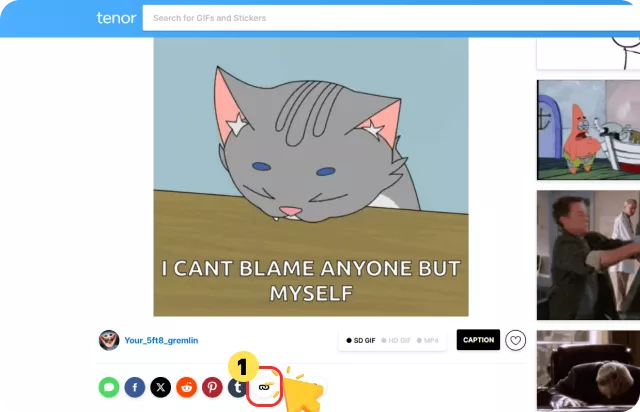
1

Go to Tenor and Copy the Link

Browse Tenor.com, find the GIF or video you want to download, and copy the full URL from your browser's address bar.

Go to Tenor and Copy the Link
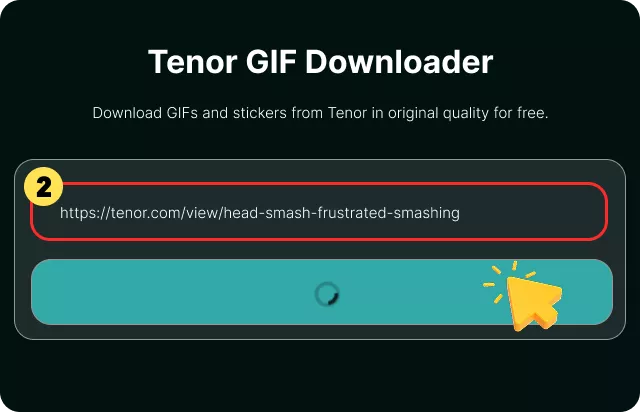
2

Paste the Link & Click Download

Paste the Tenor link into the input box above and click the "Download" button.

Paste the Link & Click Download
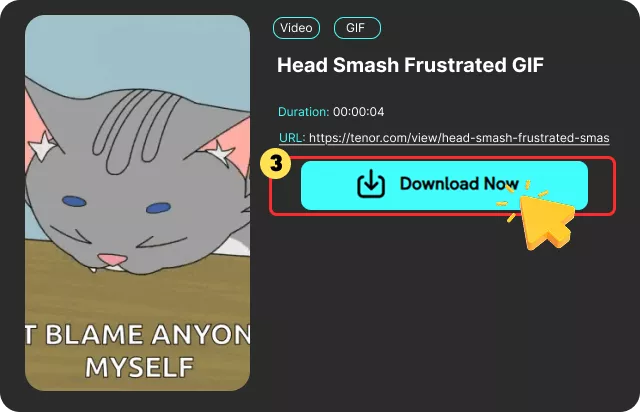
3

Download Your GIF or MP4 File

Wait for the tool to process the content. Once ready, download your GIF or MP4 file directly to your device.

Download Your GIF or MP4 File

What Is a Tenor Downloader ?

A Tenor Downloader is an online tool that helps you save GIFs, stickers, and videos from Tenor.

Instead of trying to save a GIF directly from your browser, you can copy the Tenor URL and paste it into a Tenor GIF downloader. The tool can then fetch the available media and provide the formats you want to download.

Depending on the source, you may be able to save a Tenor GIF as GIF, MP4, or WebP. GIF is useful when you want the original animated image format, while MP4 can provide a smaller video file for sharing and other applications.

Whether you're looking for a Tenor GIF downloader, or Tenor MP4 downloader, this tool provides a simple way to process Tenor URLs online easily.

What Users Say About Our Free Tenor GIF Downloader

I love how simple this tool is. The tenor gif download online process is fast, and it works perfectly when I need reaction GIFs for my social media posts.

Emma Wilson

Emma Wilson

A very useful downloader for creators. It helps me download gif from tenor easily for offline use and creative projects.

Daniel Carter

Daniel Carter

This Tenor downloader saves me a lot of time when collecting GIFs for my content. I can download them quickly instead of searching for them online.

Alex Morgan

Alex Morgan

I love how simple this tool is. The tenor gif download online process is fast, and it works perfectly when I need reaction GIFs for my social media posts.

Emma Wilson

Emma Wilson

A very useful downloader for creators. It helps me download gif from tenor easily for offline use and creative projects.

Daniel Carter

Daniel Carter

This Tenor downloader saves me a lot of time when collecting GIFs for my content. I can download them quickly instead of searching for them online.

Alex Morgan

Alex Morgan

Frequently Asked Questions

Yes, our Tenor Downloader is 100% free to use with no registration, hidden fees, or software installation required. You can free download tenor gif as many times as you need.

cookieWe use cookies to improve your FliFlik experience. Read our policy here.