
Download Storyblocks Videos
Save high-quality Storyblocks videos in MP4 format. Our storyblocks video downloader extracts videos in the best available resolution, including HD and 4K, perfect for your editing projects.

Download videos, images, and audio from Storyblocks listings. 100% Free and Easy to Use.
 No Signup Needed100% FreeHD & 4K Quality
Our Storyblocks Downloader helps creators, editors, and designers save stock videos, photos, and audio from Storyblocks quickly.
Save high-quality Storyblocks videos in MP4 format. Our storyblocks video downloader extracts videos in the best available resolution, including HD and 4K, perfect for your editing projects.

Download Storyblocks images and photos in high resolution. Save individual pictures or complete collections for your design and creative work.

Extract Storyblocks audio files, including music tracks and sound effects. Our storyblocks audio downloader saves files in MP3 or other available formats.

Get clean media files. Download Storyblocks video without watermark or unwanted overlays. Save the original quality for professional use.

Enjoy a secure download experience without malware or hidden risks, while keeping your privacy protected.

Use our Storyblocks Downloader on Windows, Mac, Android, iPhone, Chrome, Edge, Firefox, and Safari.
Follow this quick guide to save your favorite Storyblocks content to your device.
Open any public Storyblocks asset listing page and copy the full URL from your browser's address bar.
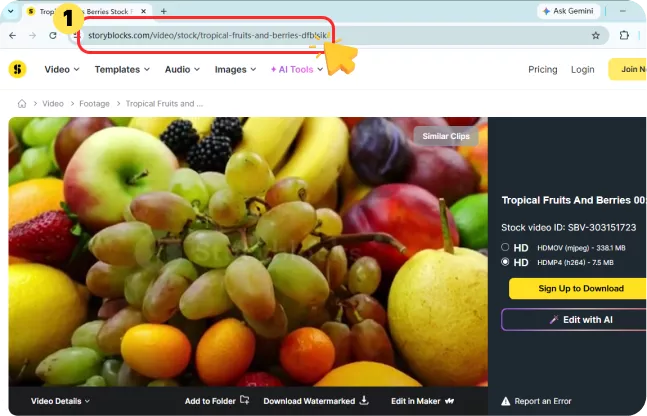
Paste the Storyblocks link into the downloader input box and click on the Download button.
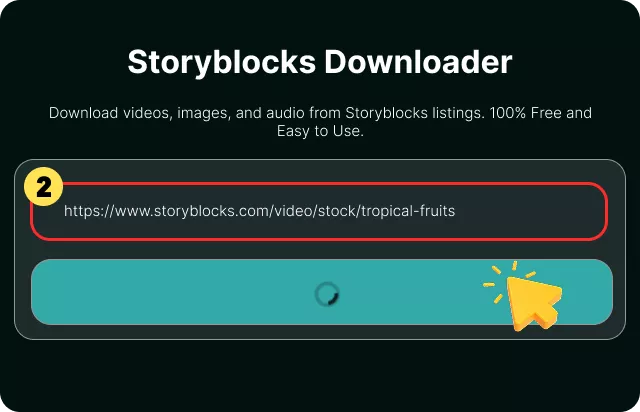
Wait for the tool to analyze the listing, then choose your video, image, or audio file and save it to your device.
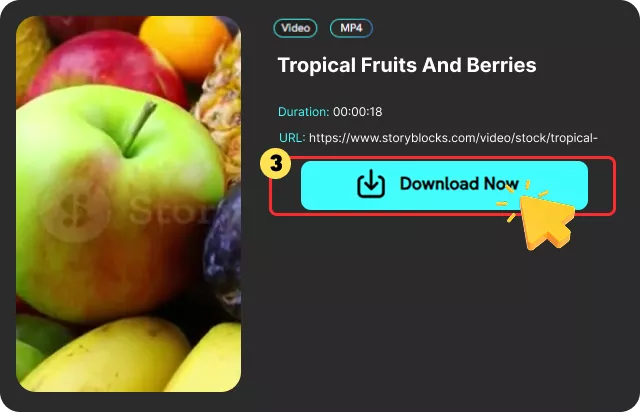
A Storyblocks downloader is a specialized online tool that enables users to save stock media—including videos, images, and audio files—from Storyblocks asset pages directly to their devices. It simplifies the process of downloading content for offline use, creative projects, or research.
Unlike manually saving files, which can be time-consuming and limited, a dedicated storyblocks video downloader automates the extraction of media in its original quality. Many tools also allow you to download Storyblocks video without watermark, providing clean, professional files ready for use.
These downloaders work by parsing the asset page's URL. Users simply copy the link from a Storyblocks listing, paste it into the downloader, and the tool handles the rest, offering a quick download of the available media. The best storyblocks downloader online options are free, require no software installation, and work across all devices, making them invaluable for creators, editors, and designers who regularly use stock assets. However, it's crucial to remember that you must have the legal rights to any content you download.

This Storyblocks downloader saves me a lot of time when collecting video clips for my projects. I can download footage quickly instead of searching for it online.

Alex Morgan

I love how simple this tool is. The storyblocks video downloader process is fast, and it works perfectly when I need references for my creative projects.

Emma Wilson
A very useful downloader for creators. It helps me save Storyblocks photos and videos easily for offline research and inspiration.

Daniel Carter
This Storyblocks downloader saves me a lot of time when collecting video clips for my projects. I can download footage quickly instead of searching for it online.
Alex Morgan
I love how simple this tool is. The storyblocks video downloader process is fast, and it works perfectly when I need references for my creative projects.
Emma Wilson
A very useful downloader for creators. It helps me save Storyblocks photos and videos easily for offline research and inspiration.
Daniel Carter
Yes, our Storyblocks Video Downloader is 100% free to use with no registration, hidden fees, or software installation required.
 We use cookies to improve your FliFlik experience. Read our policy here.