Unlimited Story Downloads
Download Instagram storie without worrying about daily download limits. FliFlik lets you save story photos and videos whenever you find content worth keeping. No need to ration downloads or wait for the next day.

Want to download Stories from Instagram? Just paste its link into FliFlik and save your favorite stories & highlights in a few clicks.
 HD Story DownloadsFree to UseDownload Without Watermark
Download Instagram storie without worrying about daily download limits. FliFlik lets you save story photos and videos whenever you find content worth keeping. No need to ration downloads or wait for the next day.

Getting ready to download stories from Instagram takes just a few simple steps. Copy the story link, paste it into FliFlik, and let the tool handle the rest. No lengthy setup or complicated procedures required.

FliFlik is a web-based IG story downloader that works across any device. Whether you are using a phone, a tablet, or a computer, simply open it in the browser to download stories without installing the app.

Download Insta story without needing to log in. Simply copy a valid Story's link and paste it into the FliFlik online Instagram downloader to bypass login requirements and save the content you want directly.

You do not need to link your Instagram account to download content. When using FliFlik, there is no need to connect an Instagram account or provide login credentials; simply use the link to a publicly visible Story to save it.

Keep the visual details of Instagram story clear when saving them. FliFlik supports high-quality downloads without adding its own watermark to the files. Revisiting this original content offline still offers a better experience.
Follow these three simple steps to save Instagram Reels, Stories, videos, and more to your device for offline viewing anytime.
Open Instagram in your browser and navigate to the story you want to save. Copy its URL directly from your browser's address bar.
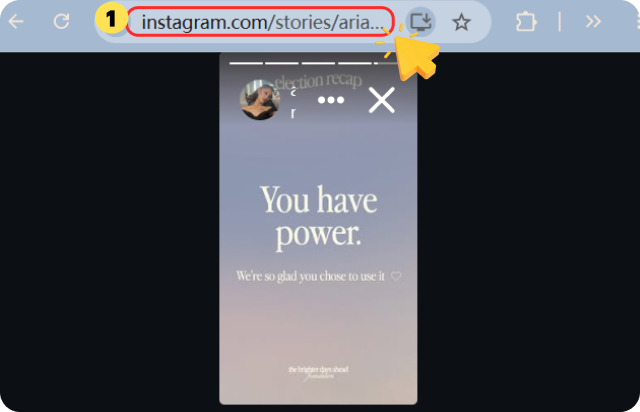
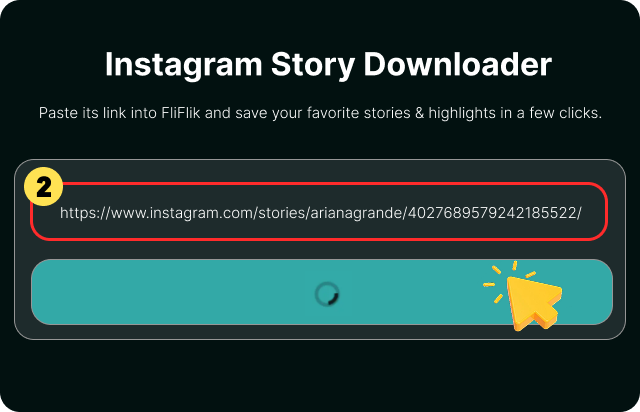
Return to FliFlik Instagram story Downloader and paste the copied URL into the input box above. Click the Download button to load the story content.
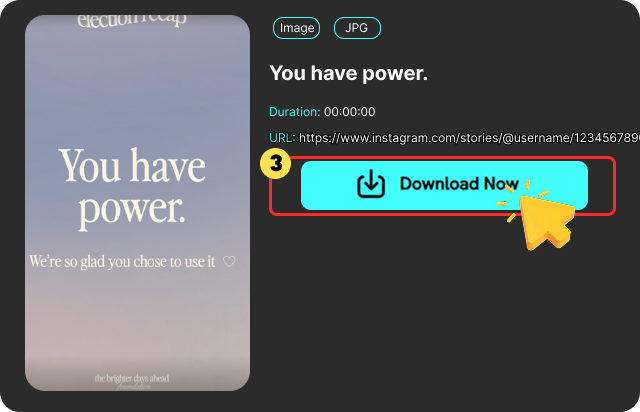
Browse the stories and select the photo or video you want to save. Click "Download" to save it to your device in JPG or MP4 format.
Have you ever found an Instagram reel or story that you just had to download, but couldn’t find a download button anywhere? If so, you are not alone. While Instagram is an excellent platform for sharing and viewing videos, you will not always get a download option. That's where MP4 downloads come in. By converting your Instagram videos to MP4, you can save them to your device, view them at your convenience, even without an internet connection...
Have you ever taken a quick screenshot on Instagram and then thought, “Wait… will they find out?” You’re not the only one; this is one of the most common questions people have about the app. There are a lot of things you can do on Instagram. It’s not always clear what the rules are for screenshots of stories, reels, DMs, and private posts. The main question we’ll answer in this article is, ” Does Instagram notify when you screenshot? ”
Holding down the button while recording Instagram videos can be exhausting and restrict the direction of the video you can display. Hands-free recording allows you to record longer, more stable videos while demonstrating products, moving around, and demonstrating full-body movements without having to worry about keeping your finger on the button. In this article, we will share everything you need to know about how to record hands-free on Instagram on Android and iPhone.
Open Instagram in your browser and copy the Story URL from the address bar. Paste it into FliFlik Instagram Story Downloader, click Download, and save the photo or video to your device.
 We use cookies to improve your FliFlik experience. Read our policy here.