Free AI Face Swap — No Login Required
Try Free Now

Instagram Photo Downloader

1 click to download Instagram photos from any public account to your device. Save pictures from IG posts, Highlight covers, or profile pictures in ultra-high resolution.

  • No Login
  • 100% Free
  • Full Size (HD & 4K)
  • No Watermark

How to Download Instagram Photos in 3 Simple Steps

Learn how to download pics from IG in original quality with 3 simple steps.

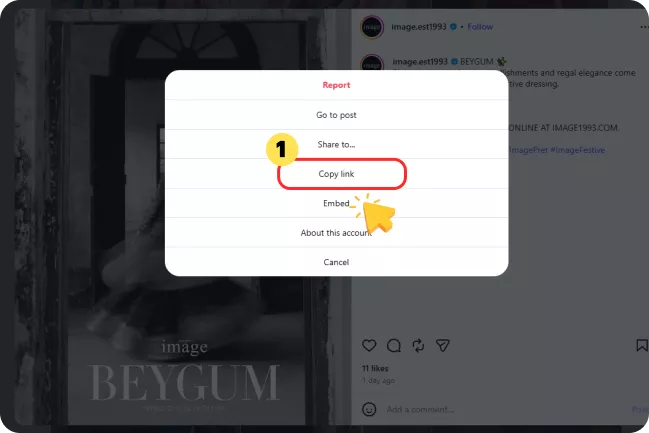
1

Copy the Post Link or Username

Mobile: Open the Instagram post, tap the three-dot menu, and select "Copy link". Desktop: Open the post in your browser and copy the URL from the address bar. You can also simply copy the profile username for profile picture and post access.

Copy the Post Link or Username
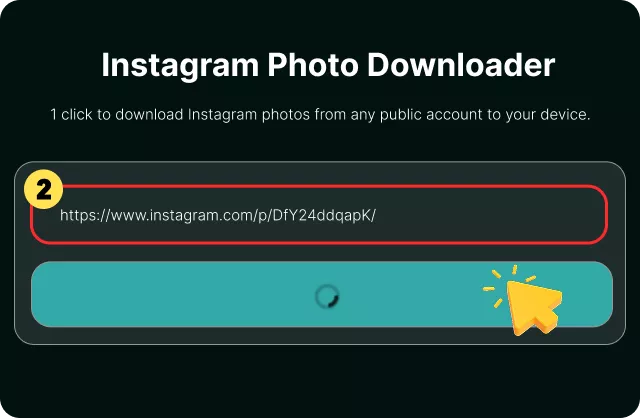
2

Paste the Post Link or Username

Paste the link or username into our Instagram Photo Downloader and click Download. The tool will locate the available images and display them in sequence.

Paste the Post Link or Username
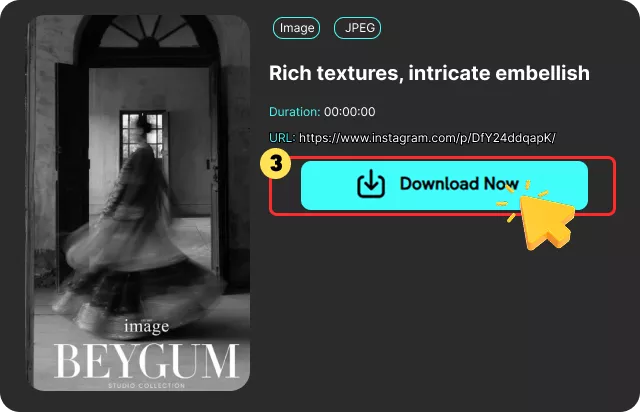
3

Save Photo to Device

Preview the images in full screen, select the ones you want, and save them directly to your device as JPG or PNG files.

Save Photo to Device

Why Choose FliFlik for Instagram Image Download

Tired of taking screenshots? You can download images from Instagram in HD without watermarks using our IG post downloader.

Save HD IG Photos

Download full-size Instagram images in HD or 4K while preserving their original resolution.Images are saved without blurring, resizing, or recompression, and without added watermarks or logos.

Download Multiple Photos at Once

Download a single image, select specific slides, or save the entire carousel in one batch. no need to open image individually.

Works with Profile Pictures, Highlights, and Stories

Beyond regular posts, this tool handles full-size profile pictures, Highlight covers, and Story images from public accounts. Enter a username to view and download all images at the largest available size.

No Login, No Installation

Use our free instagram photo downloader without login or registration. No Chrome extension, no app, and no Instagram account required. Simply paste a link or username and download.

Anonymous and Private

The tool does not store your links or download history. Your instagram photo download activity stays private, and no personal information is collected.

Works on Any Device

Save your favorite Instagram photos online from any browser — Chrome, Safari, Firefox, or Edge — on desktop, tablet, or phone. No app installation needed.

Download Instagram Photos in Full Resolution

Instagram compresses every image you upload, and the version shown in the app is rarely the original file. Screenshots capture whatever fits on your screen, including interface elements, and usually end up smaller and softer than the source. An Instagram photo downloader retrieves the image file Instagram stores for a public post, so what you save matches what the creator uploaded rather than a re-captured copy.

Keeping full-resolution files matters for more than pixel count. Designers and marketers use saved photos for mood boards, client decks, and competitive research, where a blurry image undermines the work. Photographers study composition and color grading, which requires detail that compression removes. Personal users archive their own posts before deleting an account or switching devices. In each case, the file needs to hold up when opened outside a phone screen.

The tool works from a link or a username, fetches the available images, and saves them as JPG or PNG without recompression. No account is needed, and nothing is stored after your download completes.

Frequently Asked Questions

Yes, the tool is free to use. There is no registration, no subscription, and no daily download limits.

cookieWe use cookies to improve your FliFlik experience. Read our policy here.