
Download Giphy GIFs in Original Quality
Save Giphy GIFs in their original format. As a dedicated Giphy downloader, this tool lets you save Giphy GIF files exactly as the creator uploaded them — no re-encoding, no compression, no watermark.

Download GIFs, Stickers and Clips from Giphy instantly for Free.
 No Login100% FreeGIF, MP4 & WebP
Our Giphy downloader helps you download Giphy GIF quickly, easily, and for free. Whether you want a single reaction GIF, a sticker, or a whole batch of links, our tool makes it effortless.
Save Giphy GIFs in their original format. As a dedicated Giphy downloader, this tool lets you save Giphy GIF files exactly as the creator uploaded them — no re-encoding, no compression, no watermark.

Convert and save Giphy GIFs as MP4 video files. Our Giphy to MP4 converter gives you a file that's often 3–5 times smaller than the GIF and plays anywhere videos do — ideal for WhatsApp, Instagram, and websites.

Every format option shows its real file size first. That way you know whether a GIF will fit Discord's 20 MB upload limit, or whether the MP4 is the smarter pick for a chat app.

Giphy stickers are GIFs with no background. Paste a sticker link, or switch the search to Stickers, and the GIF and WebP files keep the see-through background.

Unlike many websites, you don't have to go through any lengthy process of registration or surveys. No software installation is required — your web browser is all you need to use our Giphy downloader online.

Use our Giphy downloader on Windows, Mac, Android, iPhone, and all leading web browsers including Chrome, Firefox, Safari, and Edge. No app or extension installation is required. On iPhone, "Save to Photos" keeps the GIF moving in the Animated album.
Follow this quick guide to save your favorite Giphy content to your device.
Open the GIF on Giphy and tap Share → Copy link, or copy the address from your browser's address bar.
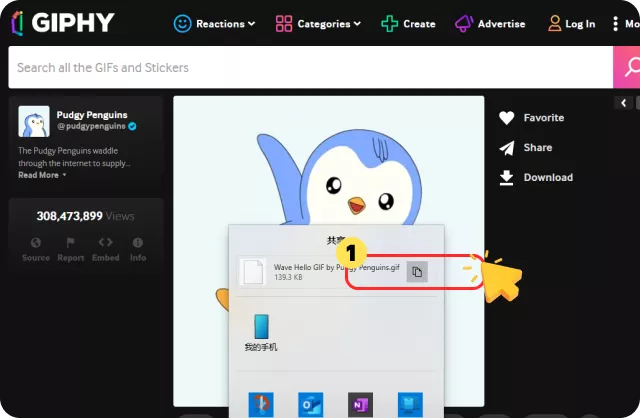
Paste the Giphy link into the input box above and click the "Download" button.
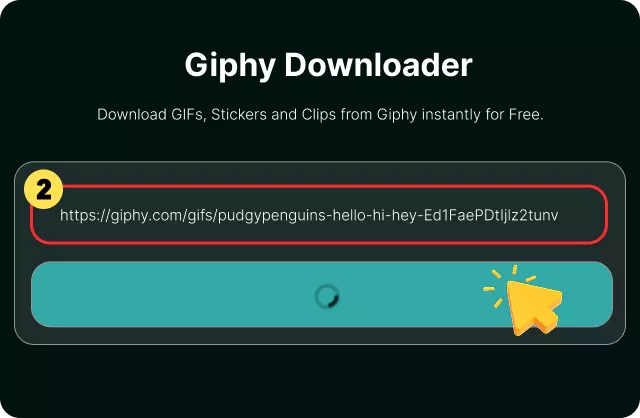
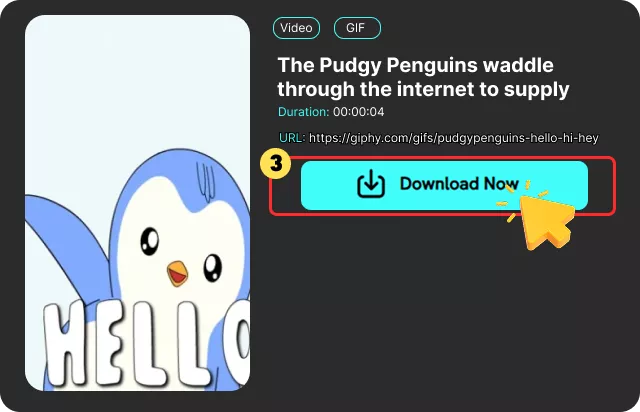
Choose the original GIF, MP4, or WebP — each shows its real size. Press Download. On Android and PC the file lands in your Downloads folder; on iPhone, tap "Save to Photos."
A Giphy downloader is an online tool that helps you save GIFs, stickers, and animated clips from Giphy. Giphy is one of the largest GIF libraries in the world, but it doesn't offer a simple way to save files directly to your device.
Instead of trying to save a GIF from your browser, you copy the Giphy URL and paste it into our Giphy downloader online. The tool fetches the available media and gives you the formats you want — GIF for the original animation, MP4 for a smaller video file, or WebP for a compact animated image.
Whether you need a Giphy to GIF converter for a chat app or a Giphy to MP4 tool for Instagram (which doesn't accept .gif uploads), this downloader handles both from a single link.
Yes, our Giphy Downloader is 100% free to use with no registration, hidden fees, or software installation required. You can download Giphy GIF files as many times as you need.
 We use cookies to improve your FliFlik experience. Read our policy here.


