
Download Without Watermark
ShareChat's own in-app download button stamps a watermark onto the video. This tool fetches the file before that happens, so there's nothing to crop out or blur. You get a clean copy ready for reposting or editing.

Download ShareChat videos without watermark for free.
 Unlimited DownloadNo Login100% FreeMulti-Platform Support
Our Sharechat Downloader is a online free easy & fast tools to download share chat videos, images & gif's from sharechat.
ShareChat's own in-app download button stamps a watermark onto the video. This tool fetches the file before that happens, so there's nothing to crop out or blur. You get a clean copy ready for reposting or editing.

The tool reads what a link actually points to and returns the matching file: MP4 for videos and Status clips, the image file for photo posts, and GIF for animated posts. No need for separate tools per format.

Whatever resolution ShareChat stored for that post is what you get. Nothing is re-compressed on the way, and nothing is upscaled either. A low-resolution upload stays low resolution, because no tool can add detail that was never recorded.

ShareChat runs in Assamese, Bengali, Bhojpuri, Gujarati, Haryanvi, Hindi, Kannada, Malayalam, Marathi, Odia, Punjabi, Rajasthani, Tamil, Telugu, and English. The language of a post's caption makes no difference here, because the tool fetches the media file itself, not the text around it.

No ShareChat account, no password, and nothing to install. A regular browser tab on a phone or computer is enough. It also works where the app's download button doesn't exist at all — on a laptop, a Chromebook, or a phone without ShareChat installed.

Download ShareChat content on Windows, Mac, Android, iPhone, and tablets using your preferred web browser (Chrome, Safari, Firefox, Edge). No app or extension installation is required.
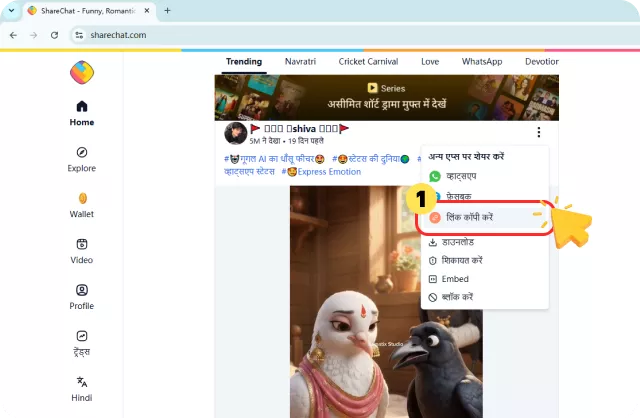
Our tool makes saving content from ShareChat incredibly easy. Follow these steps to download ShareChat video, Status clip, photo, or GIF:
In ShareChat, tap Share on the post and choose Copy Link. The link looks like sharechat.com/video/ followed by the post's ID.
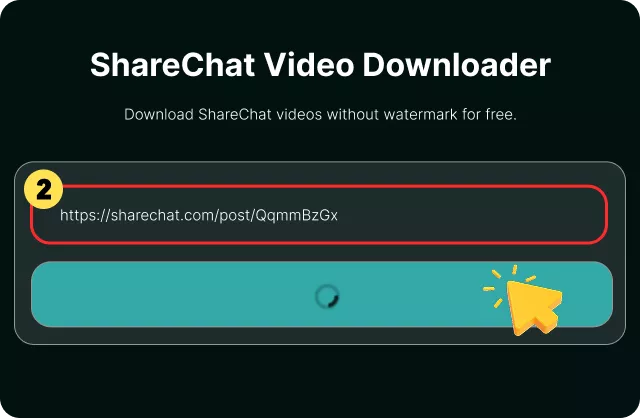
Paste only the link into the box above. Our tool will automatically detect and analyze the available content from the link.
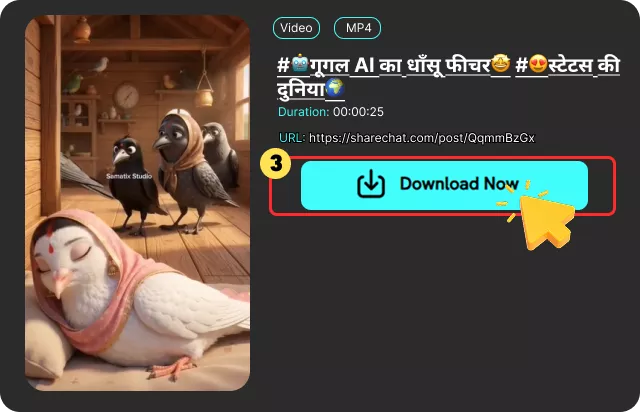
Tap Download, then Save. You get the post's original file, without the ShareChat watermark the app's own download button stamps on.
ShareChat is one of India's largest social media platforms, built around regional language communities. It runs in 15 languages, including Hindi, Tamil, Telugu, Bengali, and Bhojpuri, and millions of users share videos, Status clips, and GIFs every day.
The problem is that ShareChat doesn't offer a clean way to save that content. The app does have a download button, but any video saved through it carries a ShareChat watermark stamped over the footage. That watermark sits permanently on the picture and cannot be removed without cropping or blurring part of the video.
This matters because much of ShareChat's content gets reshared on WhatsApp Status — good-morning clips, festival greetings, devotional songs. A clip with another app's logo in the corner looks cluttered. The app's button also only works inside the app, so laptop and Chromebook users have no way to save a post at all.
A ShareChat video downloader solves both problems. It fetches the original file ShareChat already stores, before any watermark is added, and delivers it in its original quality. It works in any browser, on any device, with no login required.
Compare FliFlik ShareChat Video Downloader with ShareChat built-in download funtion below to see the differences.


Yes, it's completely free. There's no sign-up, no payment, and no limit on how many videos you can download. Just paste a link and save the file. You can use it as often as you need.
 We use cookies to improve your FliFlik experience. Read our policy here.