
Simple and Safe to Use
Download PineDrama videos with FliFlik is incredibly simple. Just paste the video link, wait for it to be automatically parsed, and click the download button to save the PineDrama video you want.

Download PineDrama videos online for free. Just paste a video link to save your favorite videos with ease.
 Free to UseNo InstallFast Parsing
Discover how FliFlik makes downloading videos from PineDrama simple, free, and convenient.
Download PineDrama videos with FliFlik is incredibly simple. Just paste the video link, wait for it to be automatically parsed, and click the download button to save the PineDrama video you want.

Use FliFlik to download PineDrama videos online for free—no software installation required. Simply open the downloader in your browser to save your favorite videos anytime, anywhere.

Save PineDrama videos in MP4 format for easy playback on compatible devices. Whether you’re revisiting your favorite clips or organizing your saved videos, the MP4 format makes managing your video collection much simpler.

You can access the FliFlik PineDrama Video Downloader via a browser on your computer, tablet, or mobile phone. There’s no need for complex setup—simply save videos whenever you need to.
Follow these simple steps to download PineDrama videos online and save your favorite episodes for offline viewing.
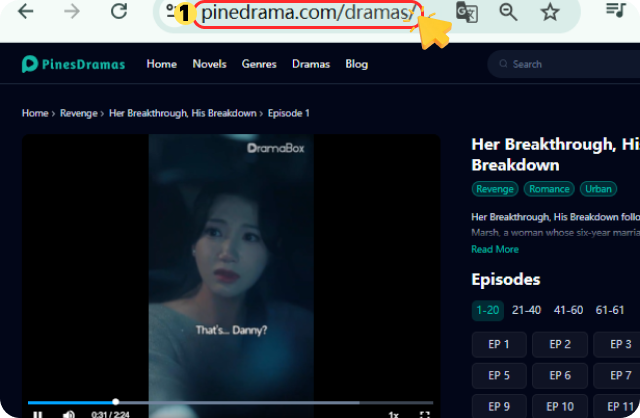
Open PineDrama and find the episode you want to save. Tap the share option and copy the video link.
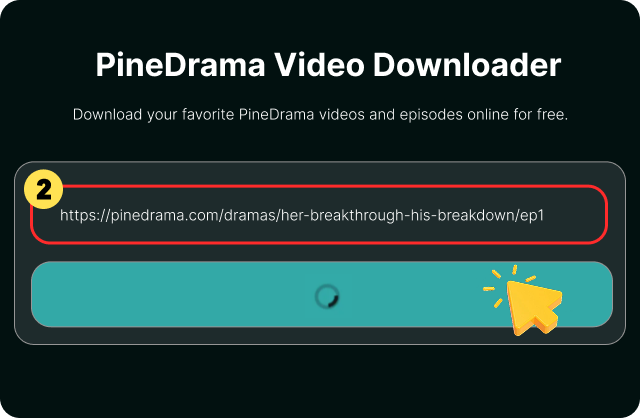
Paste the copied link into the FliFlik PineDrama Video Downloader search box and start processing the video.
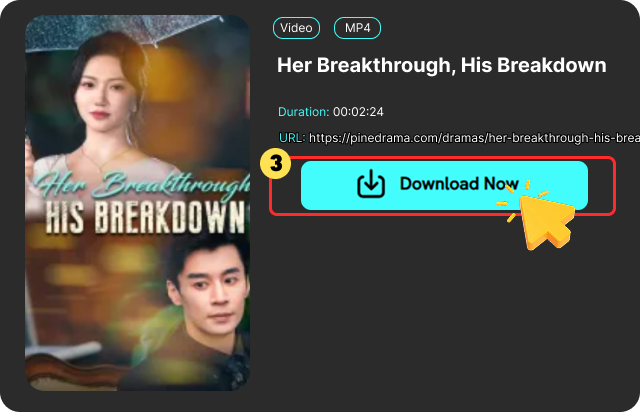
Choose an download option to save the video in MP4 format for offline viewing.
Compare FliFlik with other free PineDrama video downloaders to find the right tool for you.
 Not required
 May be required
 YesDepends on the toolFree to useFree or paid optionsFastDepends on the tool NoVaries by toolHighVaries by tool
There's no need to download complex plugins or additional client software; simply paste the share link for a short-form drama into the webpage to instantly extract the video source—perfect for quick, one-off needs or downloading individual episodes.

Liam Miller

As long as the original video is high-quality, the resulting MP4 file will essentially be free from any significant loss in quality due to re-encoding; when played in portrait mode on a mobile device, the image appears crisp and clear, with excellent color reproduction.

Emma Watson
Compared to the many free parsing websites on the market—which are often cluttered with pop-up ads and deceptive, click-baiting elements—FliFlik offers a relatively clean, uncluttered interface, ensuring a more hassle-free user experience.

Lucas Silva
There's no need to download complex plugins or additional client software; simply paste the share link for a short-form drama into the webpage to instantly extract the video source—perfect for quick, one-off needs or downloading individual episodes.
Liam Miller
As long as the original video is high-quality, the resulting MP4 file will essentially be free from any significant loss in quality due to re-encoding; when played in portrait mode on a mobile device, the image appears crisp and clear, with excellent color reproduction.
Emma Watson
Compared to the many free parsing websites on the market—which are often cluttered with pop-up ads and deceptive, click-baiting elements—FliFlik offers a relatively clean, uncluttered interface, ensuring a more hassle-free user experience.
Lucas Silva
PineDrama Downloader is a third-party video parsing tool for PineDrama, ByteDance's overseas vertical short drama app, which allows users to convert drama share links into MP4 format to save locally for offline viewing.
 We use cookies to improve your FliFlik experience. Read our policy here.


