
Download Patreon Videos in MP4
Our Patreon videos downloader saves videos in MP4 format at the best available quality. Enjoy crystal-clear playback on any device, with resolution options that match what the creator uploaded.

Download Patreon Videos from Your Favorite Creators instantly for Free.
 No Signup Needed100% FreeHigh Resolution
Our Patreon downloader is designed to help users download video from Patreon quickly, easily, and for free. Whether you want to save a tutorial, an exclusive behind-the-scenes clip, or a creator's video post for offline viewing, our Patreon videos downloader makes it simple.
Our Patreon videos downloader saves videos in MP4 format at the best available quality. Enjoy crystal-clear playback on any device, with resolution options that match what the creator uploaded.

Use the Patreon downloader directly in your browser. While many users search for a Chrome extension or a command-line tool like patreon-dl, our web-based approach works just as well — and you don't need to install anything.

Your download requests aren't stored. We do not keep any record of what you download. Your privacy comes first.

Works on Windows, macOS, Android, iPhone, Chrome, Edge, Firefox, and Safari. No matter what device you use, the process is the same.
Follow this quick guide to download video from Patreon to your device.
Open the Patreon post containing the video you want to save. Copy the full URL from your browser's address bar. On mobile, use the share menu to copy the link.
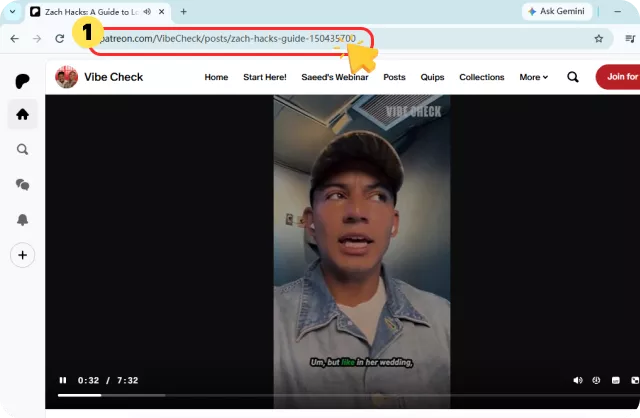
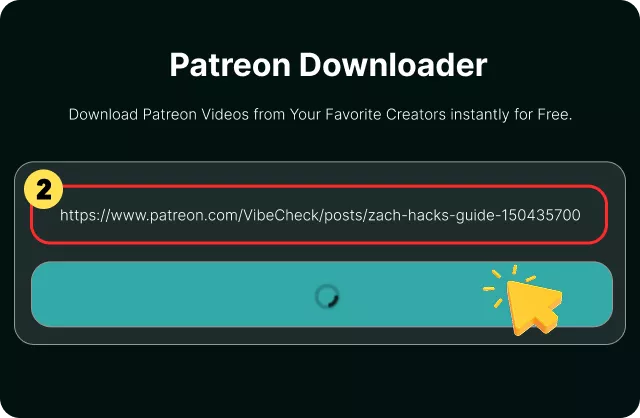
Paste the Patreon link into the input box on FliFlik and click the "Download" button. Our tool will automatically parse the post and prepare the available media options.
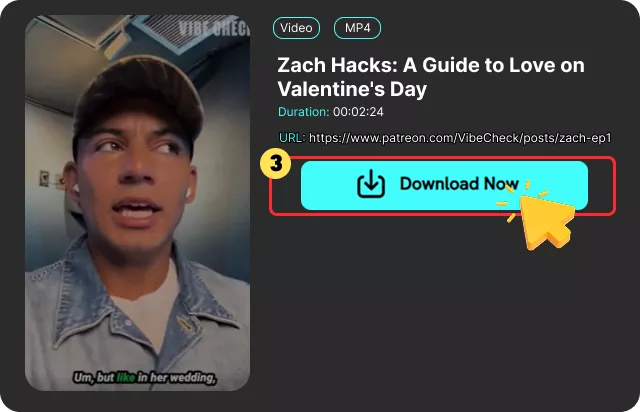
Preview the available quality, then save the video directly to your device as an MP4 file. The entire process takes just a few seconds.

I've tried a few Patreon downloaders, but this one is the simplest. The download process takes seconds and the quality is perfect. It's fast, free, and meets all my needs.

Alex Morgan

I used this Patreon downloader to save some tutorial videos from a creator I support. The download speed was impressive, and the video quality remained crystal clear. I've already recommended it to my friends!

Michael Brown
As a regular Patreon supporter, I often find videos I want to save for later. FliFlik makes this incredibly easy—just copy, paste, and download. The quality stays perfect, and I can watch offline whenever I want.

Daniel Carter
I've tried a few Patreon downloaders, but this one is the simplest. The download process takes seconds and the quality is perfect. It's fast, free, and meets all my needs.
Alex Morgan
I used this Patreon downloader to save some tutorial videos from a creator I support. The download speed was impressive, and the video quality remained crystal clear. I've already recommended it to my friends!
Michael Brown
As a regular Patreon supporter, I often find videos I want to save for later. FliFlik makes this incredibly easy—just copy, paste, and download. The quality stays perfect, and I can watch offline whenever I want.
Daniel Carter
Yes, our tool is completely free to use. No registration, no hidden fees, and no "freemium" wall where basic downloads are locked behind a payment . Just paste the link and download.
 We use cookies to improve your FliFlik experience. Read our policy here.