Free AI Face Swap — No Login Required
Try Free Now

Online Video Downloader and Converter

Free online video downloader for Dailymotion, Facebook, Twitter, Tiktok, Pinterest, Instagram, Vimeo and many other sites, Convert any online video to MP4, MP3, WAV, M4A, Webm and more.

  • No Login
  • Fast Conversion
  • 100% Safe
  • No Ads

Best Online Video Downloader

Our video downloader is a free online tool that lets you save streaming video and audio from over 1,000 websites. Whether it's Twitter, TikTok, Instagram, Facebook, Vimeo, or Dailymotion, just paste the link and download the file. No app, no extension, no account needed.

Supports 1,000+ Websites

Our online video downloader works with more than 1,000 streaming sites, including YouTube, TikTok, X (Twitter), Instagram, Facebook, Vimeo, Dailymotion, Reddit, and Bilibili. You don't need separate tools for different platforms. Just paste the link, and the tool fetches the file for you.

Convert to MP4, MP3, and More

Our video downloader lets you convert videos to MP4, or extract audio as MP3, AAC, M4A, WebM, and other formats. One click is all it takes to save the file in the format that works for your device.

Download Video and Audio Separately

Some sites, like YouTube, deliver video and audio as separate streams. Our tool lets you download both files individually, so you can merge them later with any video editor. This ensures you get the full quality, not a compressed version.

Download Subtitles and Captions

When subtitles or closed captions are available, our online video downloader lets you save them too. Perfect for language learning, accessibility, or repurposing content into text.

High-Quality HD Downloads

You can download video from website pages in their original quality. Enjoy crisp, clear videos up to 1080p and even 4K when available, for offline viewing, content creation, or archiving.

A Real Download Button, No Traps

Our tool gives you a direct download link. There are no fake buttons, no pop-up ads, and no redirects to unrelated pages. What you see is what you get.

How to Download Video via Link in 3 Simple Steps?

Follow this quick guide to download video from website pages to your device.

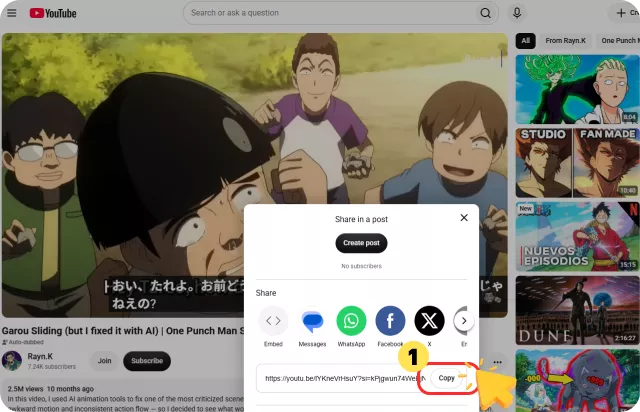
1

Copy the Video Link

Browse the website hosting the video you want to download, and copy the full URL from your browser's address bar.

Copy the Video Link
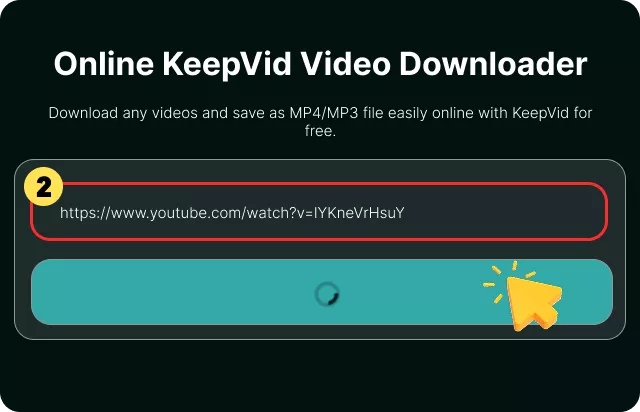
2

Paste the Link into the Downloader

Paste the video link into the input box above and click the "Download" button.

Paste the Link into the Downloader
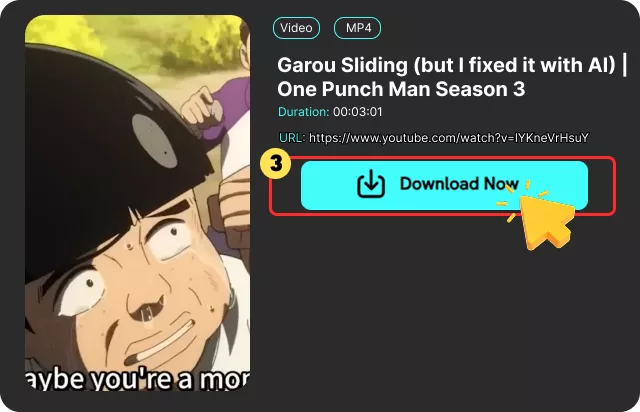
3

Download Your MP4 or MP3 File

Wait for the online video downloader to process the content. Once ready, download your MP4 or MP3 file directly to your device.

Download Your MP4 or MP3 File

What Is an Online Video Downloader ?

An online video downloader is a web-based tool that lets you save videos from streaming websites directly to your device. Instead of installing software, you simply download video via link — paste the URL into the tool, and it fetches the file for you.

Our video downloader works by reading the link you provide, locating the video file on the source website, and preparing it for download in your preferred format. It supports both MP4 video and MP3 audio, so you can save the full video or just the soundtrack.

People use this tool for many reasons: watching videos offline during travel, archiving content for personal reference, extracting audio for music or podcasts, or saving tutorials and lectures for later study. The best part is that it works entirely in your browser, on any device, and requires no account or registration. However, it's important to remember that you should only download video from website pages where you have the right to save the content.

What Our Users Say About Our Online Video Downloader

As a regular user, I often find videos I want to save for later. This video downloader makes it incredibly easy—just copy, paste, and download. I especially appreciate that it maintains the high video quality and lets me access my saved content offline.

Tommy Miller

Tommy Miller

I've tried several video downloaders, but this one is by far my top recommendation. I frequently save documentaries, tutorials, and other interesting clips. The download process takes seconds and the quality is perfect.

Michael Brown

Michael Brown

I used this online video downloader for the first time to save some music videos and short films. The download speed was impressive, and the video quality remained crystal clear for offline viewing. I've already recommended it to my friends!

Michael Brown

Michael Brown

As a regular user, I often find videos I want to save for later. This video downloader makes it incredibly easy—just copy, paste, and download. I especially appreciate that it maintains the high video quality and lets me access my saved content offline.

Tommy Miller

Tommy Miller

I've tried several video downloaders, but this one is by far my top recommendation. I frequently save documentaries, tutorials, and other interesting clips. The download process takes seconds and the quality is perfect.

Michael Brown

Michael Brown

I used this online video downloader for the first time to save some music videos and short films. The download speed was impressive, and the video quality remained crystal clear for offline viewing. I've already recommended it to my friends!

Michael Brown

Michael Brown

Frequently Asked Questions

Yes. Our video downloader is a completely free, web-based tool that lets you download videos to MP4 or MP3. Just copy the video link, paste it into the tool, and click "Download" – it's that simple.

cookieWe use cookies to improve your FliFlik experience. Read our policy here.