1
Copy the LinkedIn Video Link
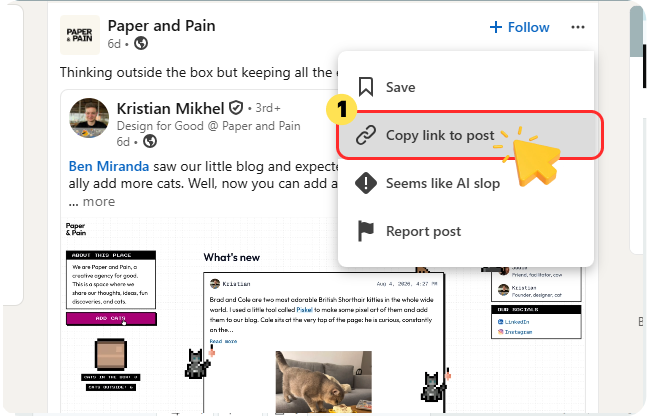
Click the three dots (...) in the upper-right corner of the post you want to download, and select "Copy link to post."

Download LinkedIn professional feeds, tutorials, and career videos as high-quality MP4s with our LinkedIn video downloader.
 Free to UseMP4 ConversionOriginal HD QualityUnlimited Download
Start downloading LinkedIn videos instantly by following these three easy steps.
Click the three dots (...) in the upper-right corner of the post you want to download, and select "Copy link to post."
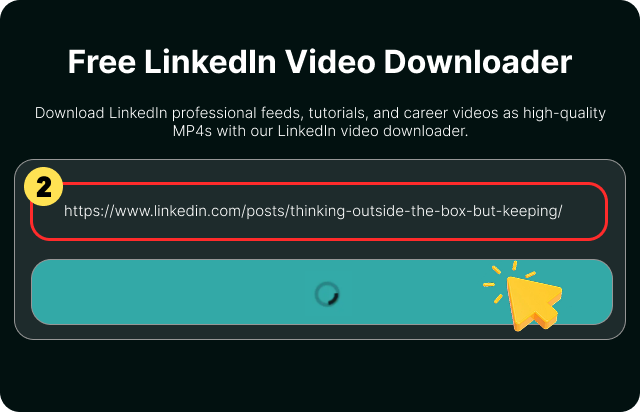
Paste the link into the box above. Our online downloader will automatically analyze the link and extract the video source.
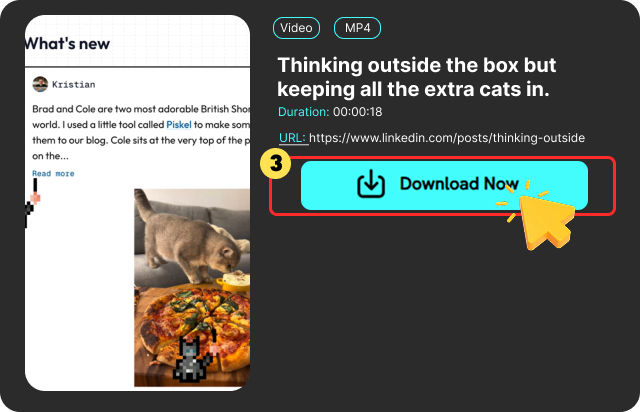
Hit the "Download Now" button to store the high-quality MP4 file directly to your device.
Discover how our powerful downloader helps you easily download videos from LinkedIn.

Reliable saving for all career clips, course walk-throughs, and extended industry talks. No video length restrictions, making long webinar offline learning seamless.

With this online LinkedIn video downloader, you can download unlimited LinkedIn videos at zero cost. No subscriptions, no hidden fees, and no restrictions on how many videos you save.

Save LinkedIn videos in standard MP4 format with just a single click. Ideal for offline viewing, team sharing, or easily embedding training clips into your presentation slides.

Our downloader saves LinkedIn videos in full HD, ensuring small presentation text, complex code, and data charts remain crystal clear and readable for offline viewing.

Enjoy a pure and simple download experience. Our downloader offers a clutter-free interface with no forced ads or hidden clickbait, letting you download videos directly and smoothly.

Our LinkedIn video downloader runs entirely in your browser. No app installation needed. Whether you use Windows, Mac, iPhone, or Android, just open a browser and start downloading videos instantly.
Looking for the right tool to download LinkedIn content? Compare essential features that shape your overall downloading experience before you get started.
 10x faster download speed
 May be slow or laggyDirect MP4 exportMay require extra conversionsOriginal HD qualityQuality may vary or dropWebinars & long videosStrict duration limitsNo installation requiredExtensions or apps neededNo account neededForced signup requiredUnlimited downloadsMay have daily limits100% freeHidden caps or paywalls
Honestly the best LinkedIn video downloader out there. I save long webinars almost daily for offline listening. Zero pop-up ads, no Chrome extension needed, and the MP4 export is super fast!

Tom Watson

This LinkedIn video downloader is fast and easy to use. I can save LinkedIn videos in seconds without signing up. Best of all, it is completely free with zero hidden costs.

Daniel Kim
My home Wi-Fi is spotty, so streaming LinkedIn Learning courses was frustrating. FliFlik lets me download LinkedIn courses as MP4s for my commute. The quality matches the original, and I don’t need to install anything.

Alex Rivera
Honestly the best LinkedIn video downloader out there. I save long webinars almost daily for offline listening. Zero pop-up ads, no Chrome extension needed, and the MP4 export is super fast!
Tom Watson
This LinkedIn video downloader is fast and easy to use. I can save LinkedIn videos in seconds without signing up. Best of all, it is completely free with zero hidden costs.
Daniel Kim
My home Wi-Fi is spotty, so streaming LinkedIn Learning courses was frustrating. FliFlik lets me download LinkedIn courses as MP4s for my commute. The quality matches the original, and I don’t need to install anything.
Alex Rivera
No, LinkedIn does not provide a native download button for video posts. You need an online tool like FliFlik to save LinkedIn videos to your device.
 We use cookies to improve your FliFlik experience. Read our policy here.


