Free AI Face Swap — No Login Required
Try Free Now

Discord Downloader - Download Any Video from Discord

Easily download Discord videos as MP4 files for offline viewing, sharing, or keeping your favorite clips in just a few clicks.

  • No Ads
  • HD Quality
  • Free_to_Use

Why Choose Our Discord Video Downloader?

Discover an useful Discord video downloader with fast downloads, high-quality output, offline access, and flexible device support.

Download Discord Videos Easily

Save videos from Discord in just a few clicks without complicated steps. Whether it’s a gaming highlight shared in a server, a tutorial from a community channel, or a memorable video sent by a friend, you can quickly save it for later viewing.

Safe & Fast Downloads

Enjoy a secure and reliable way to download Discord videos without worrying about unnecessary software, intrusive pop-ups, or complicated download processes. Videos are downloaded directly to your device, allowing you to save content with greater peace of mind and ease.

Preserve High Video Quality

Ensure that downloaded Discord videos remain crisp and detailed, avoiding any noticeable drop in image quality. This is particularly important for gaming highlights, tutorials, screen recordings, and other videos that require the clear display of fine details.

Offline Video Access

This online Discord video downloader allows you to watch them even without a stable internet connection. You can save helpful tutorials to watch during your commute, keep highlights to enjoy while traveling, or access important videos directly without the hassle of searching for them again in Discord.

No Sign-Up & No Installation

You can use FliFlik free Discord downloader immediately without creating an account or installing extra software. When you find a Discord video worth saving, simply open the downloader and get started without adding another app or registration step to your workflow.

Download on Any Device

Whether you are using a smartphone, tablet, or computer, you can save Discord videos to a location of your choice. This allows you to easily access shared clips, tutorials, screen recordings, and other useful videos at any time across the devices you use daily.

How to Download TikTok Videos without Any Watermark

Here are 3 simple steps on how to save videos on TikTok.

1

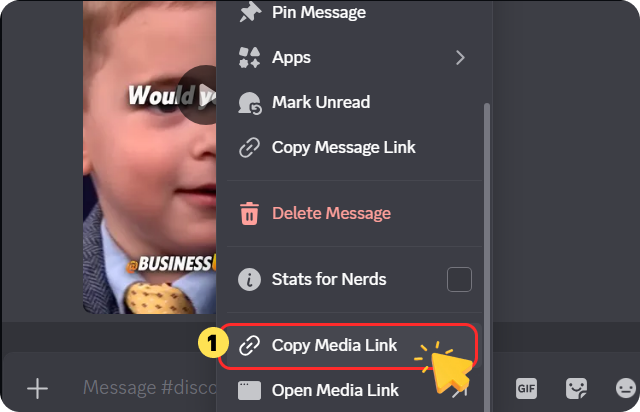
Copy the Discord Video Link

Open Discord and find the video you want to save. Copy the video link from the message or shared content.

Copy the Discord Video Link
2

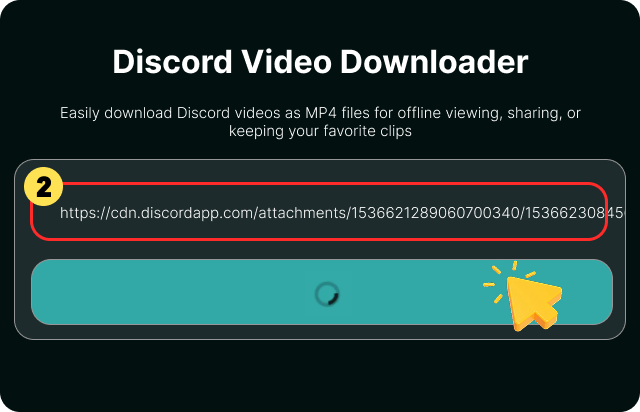
Paste URL into FliFlik Discord Downloader

Paste the copied Discord video link into the input box and start the process; the downloader will automatically analyze the link.

Paste URL into FliFlik Discord Downloader
3

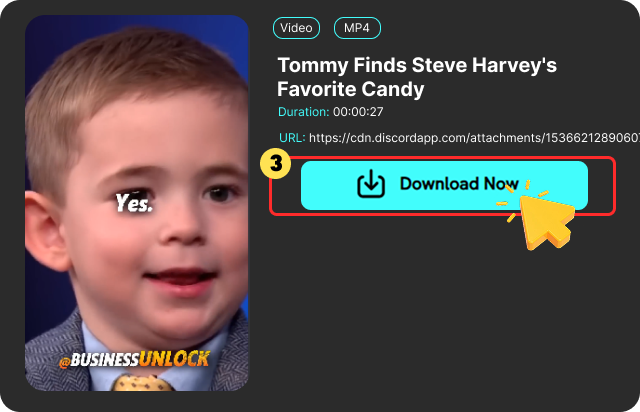
Download the Discord Video

Finally, click the "Download" button to save the Discord video to your device for offline viewing.

Download the Discord Video

How to Send Long Videos on Discord?

Sending long videos on Discord can be challenging when the file size exceeds direct upload limits. Compressing the video reduces its size, making it easier to share on Discord without compromising the content. Once compressed, you can save the file to your device for future sharing or offline viewing.

If you need to save long or compressed videos shared on Discord, the FliFlik online Discord video downloader offers a simple solution. Just paste the Discord video link, let FliFlik Discord Video Downloader automatically process the URL, and download the video directly to your device.

FliFlik Discord Video Downloader User Reviews

I’ve joined a few gaming-related Discord servers where people often share funny game clips and highlights from matches. I wanted to save some of them so I wouldn’t have to go through the trouble of searching through channel chat logs later. FliFlik makes this really easy—I just copy the Discord video link, paste it into the downloader, and the video downloads directly to my computer.

Tim

Tim

I found a long tutorial video on a Discord server and wanted to watch it during my flight. Before leaving, I downloaded it using FliFlik so I wouldn’t have to rely on an internet connection while traveling. The whole process was very simple, and having the video saved locally is much more convenient.

Luke

Luke

My friend sent me a tutorial video for a project on Discord. To avoid having to search through my chat history every time I need it, I saved the video using FliFlik. The system automatically parses the link, allowing you to download the video without having to install any software or create an account.

Jordan

Jordan

I’ve joined a few gaming-related Discord servers where people often share funny game clips and highlights from matches. I wanted to save some of them so I wouldn’t have to go through the trouble of searching through channel chat logs later. FliFlik makes this really easy—I just copy the Discord video link, paste it into the downloader, and the video downloads directly to my computer.

Tim

Tim

I found a long tutorial video on a Discord server and wanted to watch it during my flight. Before leaving, I downloaded it using FliFlik so I wouldn’t have to rely on an internet connection while traveling. The whole process was very simple, and having the video saved locally is much more convenient.

Luke

Luke

My friend sent me a tutorial video for a project on Discord. To avoid having to search through my chat history every time I need it, I saved the video using FliFlik. The system automatically parses the link, allowing you to download the video without having to install any software or create an account.

Jordan

Jordan

Frequently Asked Questions

Copy the Discord video link, paste it into FliFlik, and click Download. FliFlik will automatically analyze the link and process the video.

cookieWe use cookies to improve your FliFlik experience. Read our policy here.