1
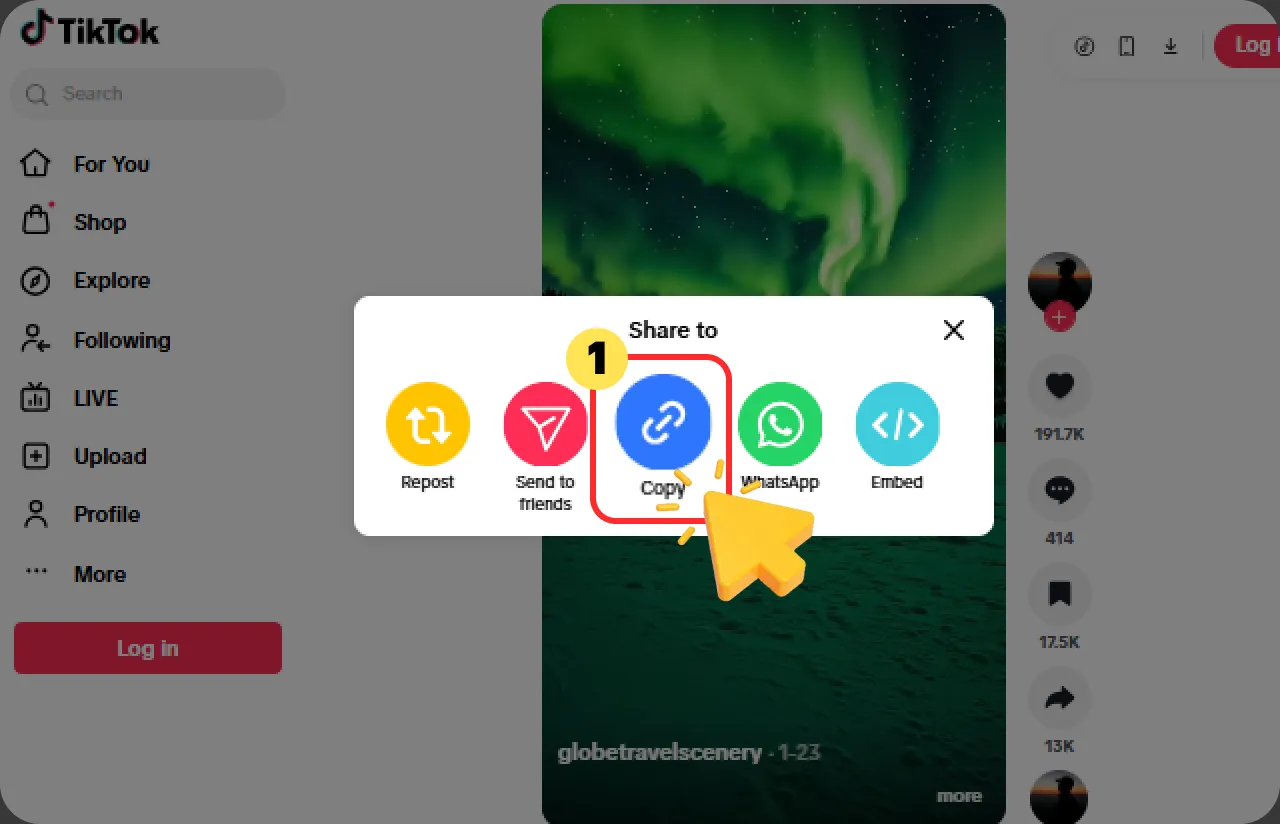
Copy the TikTok Video URL
On mobile, tap "Share" on the TikTok video and choose "Copy link". On desktop, copy the video URL from your browser or use the share option to get the link.

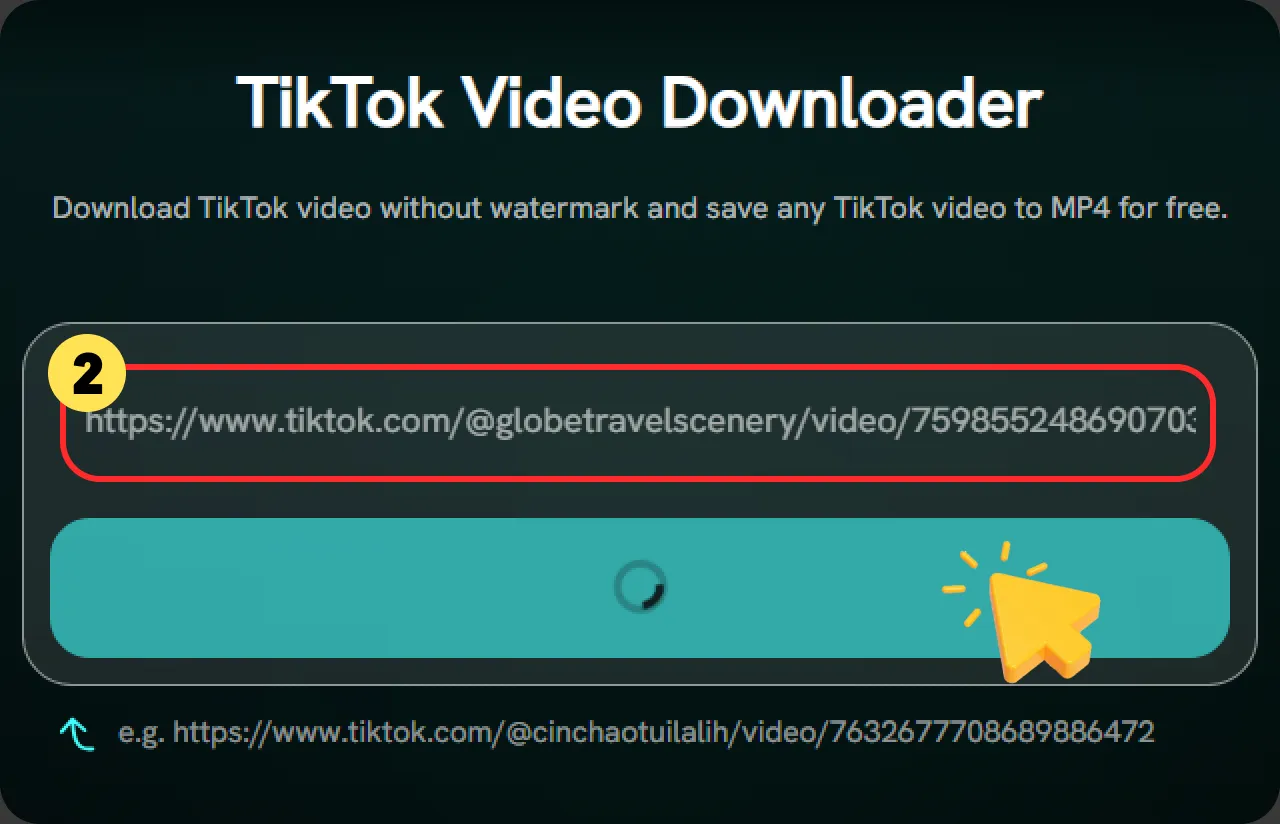
Download TikTok video without watermark and save any TikTok video to MP4 for free.
 No WatermarkFast DownloadUniversal CompatibilityNo Login
Here are 3 simple steps on how to save videos on TikTok.
On mobile, tap "Share" on the TikTok video and choose "Copy link". On desktop, copy the video URL from your browser or use the share option to get the link.
Paste the copied TikTok link into the FliFlik input box and click the "Download" button. FliFlik will automatically parse the link and prepare a watermark-free version of the video.
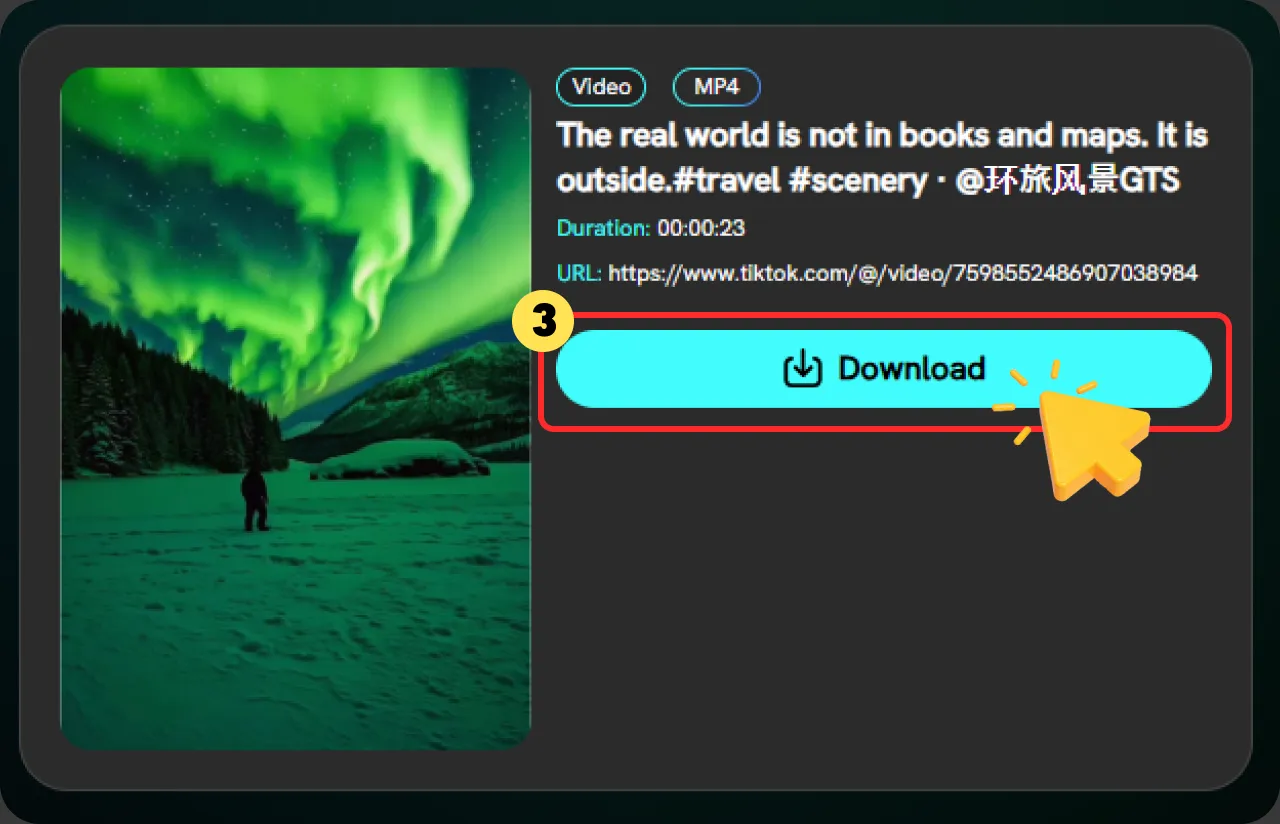
Preview the available HD result and save the TikTok video without watermark directly to your device in just a few seconds.
FliFlik is one of the most popular TikTok downloaders, designed to help users download video from TikTok quickly, easily, and for free.

Download any TikTok video without annoying watermarks and enjoy clean, high-quality videos for offline viewing or sharing.

Enjoy a secure and reliable TikTok video downloading experience without malware or hidden risks, while keeping your privacy protected.

Save time with AI-powered acceleration technology that helps you download your favorite TikTok videos faster and more efficiently.

No account creation or additional software installation is required. Simply visit the webpage to download TikTok videos for free.

Convert TikTok videos to MP4 or extract high-quality MP3 audio with one click, making it easy to save and enjoy your favorite videos and music anytime, anywhere.

Download TikTok videos smoothly on any device, including computers, smartphones, and tablets, with a seamless experience across all major browsers.
Looking for a better TikTok video saver experience? FliFlik Downloader provides fast, secure, and watermark-free TikTok video downloads with support for MP4 and MP3 conversion. Compare FliFlik Downloader with other TikTok video downloaders below to see the differences.
 Remove TikTok watermark
 Usually keeps watermarkSupport high-quality downloads
 Quality may be reducedSupportedSupportedConvert videos to MP3Not always availableNo account neededSome require sign-upAI-powered accelerationNormal speedWorks on PC, mobile, and tabletsLimited compatibilityNo malware or hidden risksUnknown security risksNo TikTok login requiredSome tools request access
J'ai utilisé ce téléchargeur de vidéos TikTok pour la première fois afin d'enregistrer de longues critiques de films parmi mes favoris TikTok. La vitesse de téléchargement était rapide et la qualité vidéo est restée nette pour un visionnage hors ligne. Je l'ai déjà recommandé à mes amis !

Sophia Miller

En tant qu'utilisatrice assidue de TikTok, je tombe souvent sur des vidéos que je veux enregistrer pour les regarder plus tard. FliFlik rend le téléchargement de ces vidéos incroyablement simple : je copie le lien, je le colle, et la vidéo est disponible instantanément. J'apprécie particulièrement sa capacité à conserver une haute qualité vidéo et la commodité d'accéder facilement au contenu enregistré.

Emily Johnson
J'ai essayé plusieurs téléchargeurs de vidéos TikTok auparavant, mais FliFlik est mon premier choix. J'enregistre souvent des critiques de films, des tutoriels et d'autres vidéos intéressantes depuis TikTok, et l'ensemble du processus de téléchargement ne prend que quelques secondes. Les vidéos téléchargées conservent une excellente qualité, ce qui me permet de les regarder hors ligne à tout moment. C'est simple, rapide et cela répond parfaitement à mes besoins.

Michael Brown
J'ai utilisé ce téléchargeur de vidéos TikTok pour la première fois afin d'enregistrer de longues critiques de films parmi mes favoris TikTok. La vitesse de téléchargement était rapide et la qualité vidéo est restée nette pour un visionnage hors ligne. Je l'ai déjà recommandé à mes amis !
Sophia Miller
En tant qu'utilisatrice assidue de TikTok, je tombe souvent sur des vidéos que je veux enregistrer pour les regarder plus tard. FliFlik rend le téléchargement de ces vidéos incroyablement simple : je copie le lien, je le colle, et la vidéo est disponible instantanément. J'apprécie particulièrement sa capacité à conserver une haute qualité vidéo et la commodité d'accéder facilement au contenu enregistré.
Emily Johnson
J'ai essayé plusieurs téléchargeurs de vidéos TikTok auparavant, mais FliFlik est mon premier choix. J'enregistre souvent des critiques de films, des tutoriels et d'autres vidéos intéressantes depuis TikTok, et l'ensemble du processus de téléchargement ne prend que quelques secondes. Les vidéos téléchargées conservent une excellente qualité, ce qui me permet de les regarder hors ligne à tout moment. C'est simple, rapide et cela répond parfaitement à mes besoins.
Michael Brown
Oui. FliFlik est un outil en ligne qui vous permet de télécharger des vidéos TikTok en MP4 gratuitement. Copiez simplement le lien de la vidéo, collez-le dans FliFlik, puis cliquez sur « Télécharger » pour l'enregistrer en trois étapes simples.
 Nous utilisons des cookies pour améliorer votre expérience avec FliFlik. Lisez notre politique ici.